CarPlay and Android Auto activation for Audi: what it is and how it is done at PRO.CTO: a complete guide
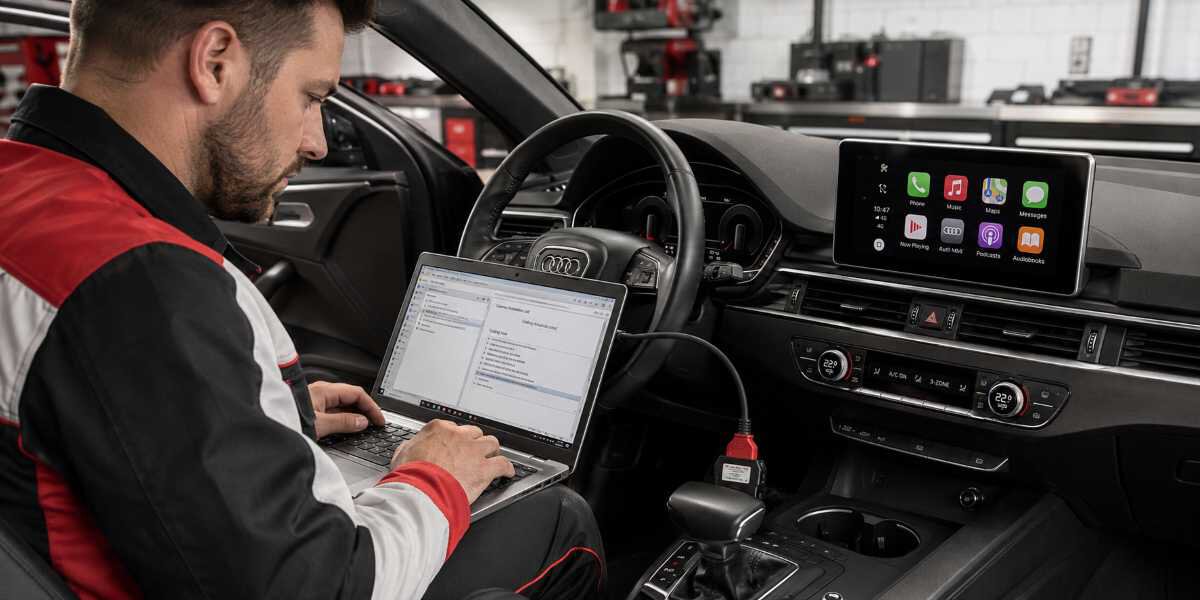
Many drivers do not even realize that their modern Audi has real multimedia potential hidden inside it. Are you used to using navigation from your phone or listening to podcasts, while the car’s screen feels unnecessary? In reality, smartphone integration with the onboard system is not just about convenience. It is a completely new level of safety and comfort. Imagine your favorite music app, Google Maps, or Waze displayed directly on the large screen, while you control everything by voice or with the buttons on the steering wheel. At PRO.CTO, we know how to make this possible on any Audi model, regardless of the year of manufacture. And the best news is that in most cases this function is already built into your car. It simply needs to be activated correctly.
Why CarPlay and Android Auto do not work and what to do about it
The most common situation we encounter at our service center is when a client buys a used car or imports it from another country and discovers that the CarPlay or Android Auto icon is missing from the menu. There may be several reasons for this, and they are not always related to a malfunction. The manufacturer often blocks this function through software for certain markets, or the previous owner simply never activated it. The issue may also be hidden in an outdated version of the MMI multimedia system, Audi Multi Media Interface. Sometimes, a firmware update is enough to make everything work. In other cases, a faulty USB port or a non-original cable may prevent the connection from being established. We always start with a full diagnostic check to rule out hardware problems, and only then move on to software settings. This is how the process of restoring access to these systems usually takes place at our technical center:
1. Equipment diagnostics. We check the USB ports, Bluetooth module, and antenna for physical damage. If there is a contact issue, we resolve it on the spot.
2. Error scanning. We connect professional diagnostic equipment to read error codes from the MMI unit. This helps determine whether the issue is a software failure or a hardware fault.
3. Coding check. We determine whether the function is activated in the hidden engineering settings menu of your car. In many cases, it is simply a “checkbox” that was not enabled at the factory.
4. Software update. If the MMI version is outdated, we install the current firmware that supports modern connection protocols.
5. Function activation. We use original VAG-COM software, ODIS, to make changes to the unit configuration, allowing CarPlay or Android Auto to be unlocked.
6. Setup and testing. We connect the client’s smartphone and check the stability of the connection, navigation, music, and calls to make sure everything works properly.
At our workshop located at 3 Street 17 - Al Quoz Industrial Area 4 - Dubai, we perform this procedure every day. It is important to understand that this is not just a “magic button”, but a technically complex process that requires knowledge of Audi specifications. Still, the result is always worth it. You get a fully functional modern multimedia center.
Signs that your Audi needs CarPlay activation at PRO.CTO in Dubai
Most Audi owners come to us not because it is trendy, but because of specific inconveniences in everyday driving. The main sign that you need this service is the constant use of a phone mounted on the windshield. This not only clutters your view but also distracts you from the road. In addition, you may be tired of poor sound quality during speakerphone calls, or of constantly switching tracks by touching your smartphone screen, which is not allowed under safety rules. This solution becomes especially relevant if you often drive on unfamiliar routes in Dubai, where it is easy to get lost without proper navigation. Audi’s built-in navigation often does not account for current traffic jams or new road sections, while Waze or Google Maps through CarPlay update in real time. It should be noted, though, that not all models support wireless connection. Older MMI 3G versions require a cable to work, while newer systems, MIB 2 and above, can be configured for Wi-Fi connection. We always recommend checking this before starting the work, so you understand which connection scenario is suitable for your specific vehicle. This significantly improves the user experience, making audio system and navigation control much more intuitive.
How we perform activation at PRO.CTO
The activation process at our service center takes from one to three hours, depending on the year of manufacture and the model of your Audi. We begin by connecting a laptop with licensed software to the vehicle’s OBD2 diagnostic port. Then we create a backup copy of the original settings so everything can be restored at any time if needed. After that, we make the required adjustments to the coded control units responsible for multimedia. We use only certified equipment, so the risk of system errors or failures is reduced to zero. Once coding is complete, we carry out a final check with different smartphones, both iOS and Android, to make sure the system works reliably. After the work is finished, we provide a short consultation on how to use Siri or Google Assistant voice control, since this greatly improves driving safety. Booking the procedure is very simple. You can call us at +971 50 104 8222 or visit our technical center directly in the Al Quoz area. We understand how important reliable connectivity and navigation are for drivers in Dubai, so we focus on both quality and speed of service. After activation, you will immediately feel the difference: the car will become not just a means of transportation, but a real assistant in your daily city trips.

 UAE
UAE RU
RU